通过酒店广告组,您可以将自己的酒店按照多个维度划分为多个酒店信息组,这样就可以相应地调整每个组的出价。 分组时,请考虑使用这样的树状结构:在第一级,将酒店大致划分为五星级酒店、四星级酒店和其他星级酒店; 然后在第二级,将其他星级的酒店划分为“美国”酒店、“英国”酒店和其他地区的酒店。
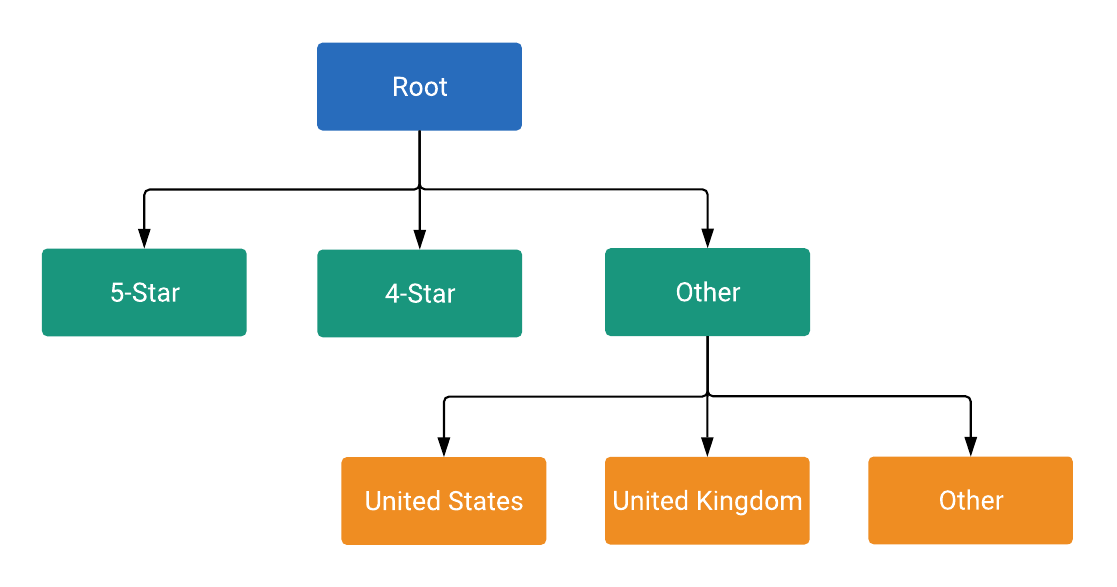
树状结构中的每个节点要么是一个子类,要么是一个单元,具体由
ListingGroupType指定。
子类会在树状结构中延伸出一个新的级别,相当于树枝,而单元则是树状结构上的树叶。每个子类之间必须始终完全分割开来,因此必须包含一个代表其他 的节点。在下面的示例中,root 和 Hotel Class: (Other) 节点都是子类。这种包含子类和单元的树状结构允许您在单元级别设置出价,并确保每项酒店信息属于且只属于树状结构中的一个单元节点。
节点是 ListingGroupInfo 类的对象,
该类包含 ListingGroupType 字段,用于
指示节点是单元,还是子类。将 ListingGroupInfo 设置为
listing_group 的 AdGroupCriterion 会将其链接到
AdGroup。
设置百分比形式的每次点击费用出价
您只能在单元节点上设置
AdGroupCriterion 的 percent_cpc_bid_micros。在子类节点上尝试执行此项设置操作,将会失败并显示错误。
信息维度
一个 ListingGroupInfo 还有一个
case_value,这是一个
ListingDimensionInfo,包含几种维度类型中的一种。ListingGroupInfo 表示与您的酒店相关联的值,例如酒店 ID、酒店所在国家/地区或酒店星级。有关可用的 ListingDimensionInfo 类型的完整说明,请参阅 参考
文档。
子类的每个直属子级都必须具有属于相同 ListingDimensionInfo 子类型的 case_value, 但根节点除外,它没有
case_value。
另请注意,每个子类都必须包含一个正确类型的“空”case_value,用于表示“所有其他值”。
如需了解更多详情,请查看下面的代码段,该代码段添加的是产品信息组树状结构的第一级。
Java
private static String addLevel1Nodes(
    long customerId,
    long adGroupId,
    String rootResourceName,
    List<AdGroupCriterionOperation> operations,
    long percentCpcBidMicroAmount) {
  // Creates hotel class info and dimension info for 5-star hotels.
  ListingDimensionInfo fiveStarredDimensionInfo =
      ListingDimensionInfo.newBuilder()
          .setHotelClass(HotelClassInfo.newBuilder().setValue(5).build())
          .build();
  // Creates listing group info for 5-star hotels as a UNIT node.
  ListingGroupInfo fiveStarredUnit =
      ListingGroupInfo.newBuilder()
          .setType(ListingGroupType.UNIT)
          .setParentAdGroupCriterion(rootResourceName)
          .setCaseValue(fiveStarredDimensionInfo)
          .build();
  // Creates an ad group criterion for 5-star hotels.
  AdGroupCriterion fiveStarredAdGroupCriterion =
      createAdGroupCriterion(customerId, adGroupId, fiveStarredUnit, percentCpcBidMicroAmount);
  // Decrements the temp ID for the next ad group criterion.
  AdGroupCriterionOperation operation = generateCreateOperation(fiveStarredAdGroupCriterion);
  operations.add(operation);

  // You can also create more UNIT nodes for other hotel classes by copying the above code in
  // this method and modifying the value passed to HotelClassInfo() to the value you want.
  // For instance, passing 4 instead of 5 in the above code will create a UNIT node of 4-star
  // hotels instead.

  // Creates hotel class info and dimension info for other hotel classes by not specifying
  // any attributes on those object.
  ListingDimensionInfo otherHotelsDimensionInfo =
      ListingDimensionInfo.newBuilder()
          .setHotelClass(HotelClassInfo.newBuilder().build())
          .build();
  // Creates listing group info for other hotel classes as a SUBDIVISION node, which will be
  // used as a parent node for children nodes of the next level.
  ListingGroupInfo otherHotelsSubdivision =
      createListingGroupInfo(
          ListingGroupType.SUBDIVISION, rootResourceName, otherHotelsDimensionInfo);
  // Creates an ad group criterion for other hotel classes.
  AdGroupCriterion otherHotelsAdGroupCriterion =
      createAdGroupCriterion(
          customerId, adGroupId, otherHotelsSubdivision, percentCpcBidMicroAmount);
  operation = generateCreateOperation(otherHotelsAdGroupCriterion);
  operations.add(operation);

  return otherHotelsAdGroupCriterion.getResourceName();
}
C#
private string AddLevel1Nodes(long customerId, long adGroupId, string rootResourceName,
    List<AdGroupCriterionOperation> operations, long percentCpcBidMicroAmount)
{
    // Create listing dimension info for 5-star class hotels.
    ListingDimensionInfo fiveStarredListingDimensionInfo = new ListingDimensionInfo
    {
        HotelClass = new HotelClassInfo
        {
            Value = 5
        }
    };

    // Create a listing group info for 5-star hotels as a UNIT node.
    ListingGroupInfo fiveStarredUnit = CreateListingGroupInfo(ListingGroupType.Unit,
        rootResourceName, fiveStarredListingDimensionInfo);

    // Create an ad group criterion for 5-star hotels.
    AdGroupCriterion fiveStarredAdGroupCriterion = CreateAdGroupCriterion(customerId,
        adGroupId, fiveStarredUnit, percentCpcBidMicroAmount);

    // Create an operation and add it to the list of operations.
    operations.Add(new AdGroupCriterionOperation
    {
        Create = fiveStarredAdGroupCriterion
    });

    // Decrement the temp ID for the next ad group criterion.
    nextTempId--;

    // You can also create more UNIT nodes for other hotel classes by copying the above code
    // in this method and modifying the value passed to HotelClassInfo().
    // For instance, passing 4 instead of 5 in the above code will instead create a UNIT
    // node of 4-star hotels.

    // Create hotel class info and dimension info for other hotel classes by *not*
    // specifying any attributes on those object.
    ListingDimensionInfo otherHotelsListingDimensionInfo = new ListingDimensionInfo
    {
        HotelClass = new HotelClassInfo()
    };

    // Create listing group info for other hotel classes as a SUBDIVISION node, which will
    // be used as a parent node for children nodes of the next level.
    ListingGroupInfo otherHotelsSubdivisionListingGroupInfo = CreateListingGroupInfo
        (ListingGroupType.Subdivision, rootResourceName, otherHotelsListingDimensionInfo);

    // Create an ad group criterion for other hotel classes.
    AdGroupCriterion otherHotelsAdGroupCriterion = CreateAdGroupCriterion(customerId,
        adGroupId, otherHotelsSubdivisionListingGroupInfo, percentCpcBidMicroAmount);

    // Create an operation and add it to the list of operations.
    operations.Add(new AdGroupCriterionOperation
    {
        Create = otherHotelsAdGroupCriterion
    });

    // Decrement the temp ID for the next ad group criterion.
    nextTempId--;

    return otherHotelsAdGroupCriterion.ResourceName;
}
PHP
private static function addLevel1Nodes(
    int $customerId,
    int $adGroupId,
    string $rootResourceName,
    array &$operations,
    int $percentCpcBidMicroAmount
) {
    // Creates hotel class info and dimension info for 5-star hotels.
    $fiveStarredDimensionInfo = new ListingDimensionInfo([
        'hotel_class' => new HotelClassInfo(['value' => 5])
    ]);
    // Creates listing group info for 5-star hotels as a UNIT node.
    $fiveStarredUnit = self::createListingGroupInfo(
        ListingGroupType::UNIT,
        $rootResourceName,
        $fiveStarredDimensionInfo
    );
    // Creates an ad group criterion for 5-star hotels.
    $fiveStarredAdGroupCriterion = self::createAdGroupCriterion(
        $customerId,
        $adGroupId,
        $fiveStarredUnit,
        $percentCpcBidMicroAmount
    );
    // Decrements the temp ID for the next ad group criterion.
    self::$nextTempId--;
    $operation = self::generateCreateOperation($fiveStarredAdGroupCriterion);
    $operations[] = $operation;

    // You can also create more UNIT nodes for other hotel classes by copying the above code in
    // this method and modifying the value passed to HotelClassInfo() to the value you want.
    // For instance, passing 4 instead of 5 in the above code will create a UNIT node of 4-star
    // hotels instead.

    // Creates hotel class info and dimension info for other hotel classes by *not* specifying
    // any attributes on those object.
    $othersHotelsDimensionInfo = new ListingDimensionInfo([
        'hotel_class' => new HotelClassInfo()
    ]);
    // Creates listing group info for other hotel classes as a SUBDIVISION node, which will be
    // used as a parent node for children nodes of the next level.
    $otherHotelsSubDivision = self::createListingGroupInfo(
        ListingGroupType::SUBDIVISION,
        $rootResourceName,
        $othersHotelsDimensionInfo
    );
    // Creates an ad group criterion for other hotel classes.
    $otherHotelsAdGroupCriterion = self::createAdGroupCriterion(
        $customerId,
        $adGroupId,
        $otherHotelsSubDivision,
        $percentCpcBidMicroAmount
    );
    $operation = self::generateCreateOperation($otherHotelsAdGroupCriterion);
    $operations[] = $operation;

    self::$nextTempId--;
    return $otherHotelsAdGroupCriterion->getResourceName();
}