图片裁剪
您可以使用本接口裁剪图片。按照您想要的尺寸对图片进行裁剪。本接口仅支持对已上传到素材库的图片进行裁剪,裁剪后的图片会自动上传到素材库并返回新的图片ID。
若想将您的原始图片上传到素材库,可使用/file/image/ad/upload/ 。
支持的图片裁剪方式
fix_size:固定长宽裁剪,不进行补边。only_gauss_pad:只进行高斯模糊补边,不进行裁剪。gauss_padding_reserve_score:高斯模糊兜底,根据图片中主体大小调整图片。
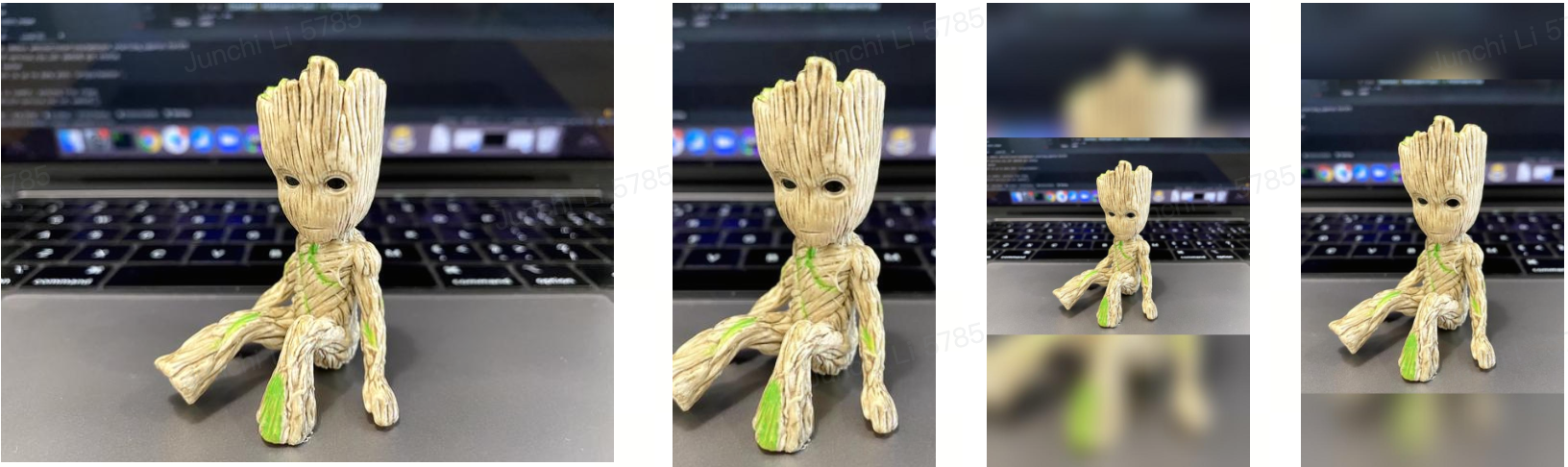
从左到右分别为原图、fix_size、only_gauss_pad和gauss_padding_reserve_score的效果。
我们建议图片的分辨率≥1200 * 628像素。
v1.2与v1.3版本对比
以下表格概括了 v1.2与v1.3接口的变化。
``xtable
|变化内容{30%}|v1.2{35%}|v1.3{35%}|
|---|---|---|
|接口路径|/v1.2/creative/image/tailor/|/v1.3/creative/image/edit/|
|请求参数名称|cut_method|edit_method|
|请求参数类型|advertiser_id: number |advertiser_id: string |
|返回参数名称|url|image_url|
|废弃返回参数|/|id`|
## 请求

**地址** https://business-api.tiktok.com/open_api/v1.3/creative/image/edit/

**方法** POST

**Header**

```xtable
|字段|类型|描述|
|--- |--- |--- |
|Access-Token {必填}|string|授权访问令牌。可以通过[获取访问令牌](https://ads.tiktok.com/marketing_api/docs?id=1738373164380162)接口获取。|
参数
|字段|类型|描述|
|---|---|---|
|advertiser_id {必填}|string| 广告主ID。 |
|image_id {必填}|string| 素材库图片ID。 |
|edit_method|string| 裁剪方式,枚举值:`fix_size`,`only_gauss_pad`,`gauss_padding_reserve_score`,默认 `fix_size`。<br>请查看上文的<strong>支持的图片裁剪方式</strong>部分了解裁剪方式的差异。|
|width {必填}|number| 裁剪后图片宽度。 |
|height {必填}|number| 裁剪后图片高度。 |
|image_name|string| 裁剪后图片名称,不填则自动生成。 |
示例
(code curl http)
curl --location --request POST 'https://business-api.tiktok.com/open_api/v1.3/creative/image/edit/' \
--header 'Access-Token: {{Access-Token}}' \
--header 'Content-Type: application/json' \
--data-raw '{
  "advertiser_id": "{{advertiser_id}}",
  "image_id": "{{image_id}}",
  "edit_method": "fix_size",
  "width": 620,
  "height": 788
}'
(/code)
返回
|字段|类型|描述|
|---|---|---|
|code |number|返回码,详见[附录-返回码](https://ads.tiktok.com/marketing_api/docs?id=1737172488964097)。|
|message |string|返回信息,详见[附录-返回码](https://ads.tiktok.com/marketing_api/docs?id=1737172488964097)。|
|data |object|返回数据。  |
#|image_id |string|图片ID,用于创建广告。|
#|material_id|string|素材ID。|
#|displayable |boolean |能否在平台展示。|
#|width |number|图片宽度。 |
#|format|string|图片格式。  |
#|image_url|string|图片URL,1小时有效期,过期后需重新获取。  |
#|height |number|图片高度。  |
#|signature |string|图片MD5。  |
#|size |number|图片大小,单位B。|
#|file_name |string |图片名称。|
#|create_time |string |创建时间。UTC 时间,格式:2020-06-10T07:39:14Z |
#|modify_time |string |修改时间。UTC 时间,格式:2020-06-10T07:39:14Z |
|request_id |string|请求的日志id,唯一标识一个请求。 |
示例
(code Success-Response http)
HTTPS/1.1 200 OK
{
  "message": "OK",
  "code": 0,
  "data": {
    "format": "jpeg",
    "image_url": "http://p1.ipstatp.com/large/ad-site-i18n/202006215d0de2e725f892ed4e31beb4",
    "file_name": "file_name_test2",
    "height": 394,
    "width": 394,
    "create_time": "2020-06-21T08:30:54Z",
    "modify_time": "2020-06-30T11:50:15Z",
    "signature": "d96d4e822020e862ed43e1d0bd104fda",
    "image_id": "ad-site-i18n/202006215d0de2e725f892ed4e31beb4",
    "size": 22305
  },
  "request_id": "2020063011501401023125104013052"
}
(/code);